

Qishu Archives
A shared entry for product documents, interface references, engineering notes, and release-ready delivery records.
SDK Architecture
How NIB separates core, device packages, command families, and language delivery packages.
NIB is not a fixed command manual. It is a layered SDK. You can start with the standard edition, or select only parts of core, device, and dialect packages when you need to control bundle size, platform scope, or exposed capabilities.
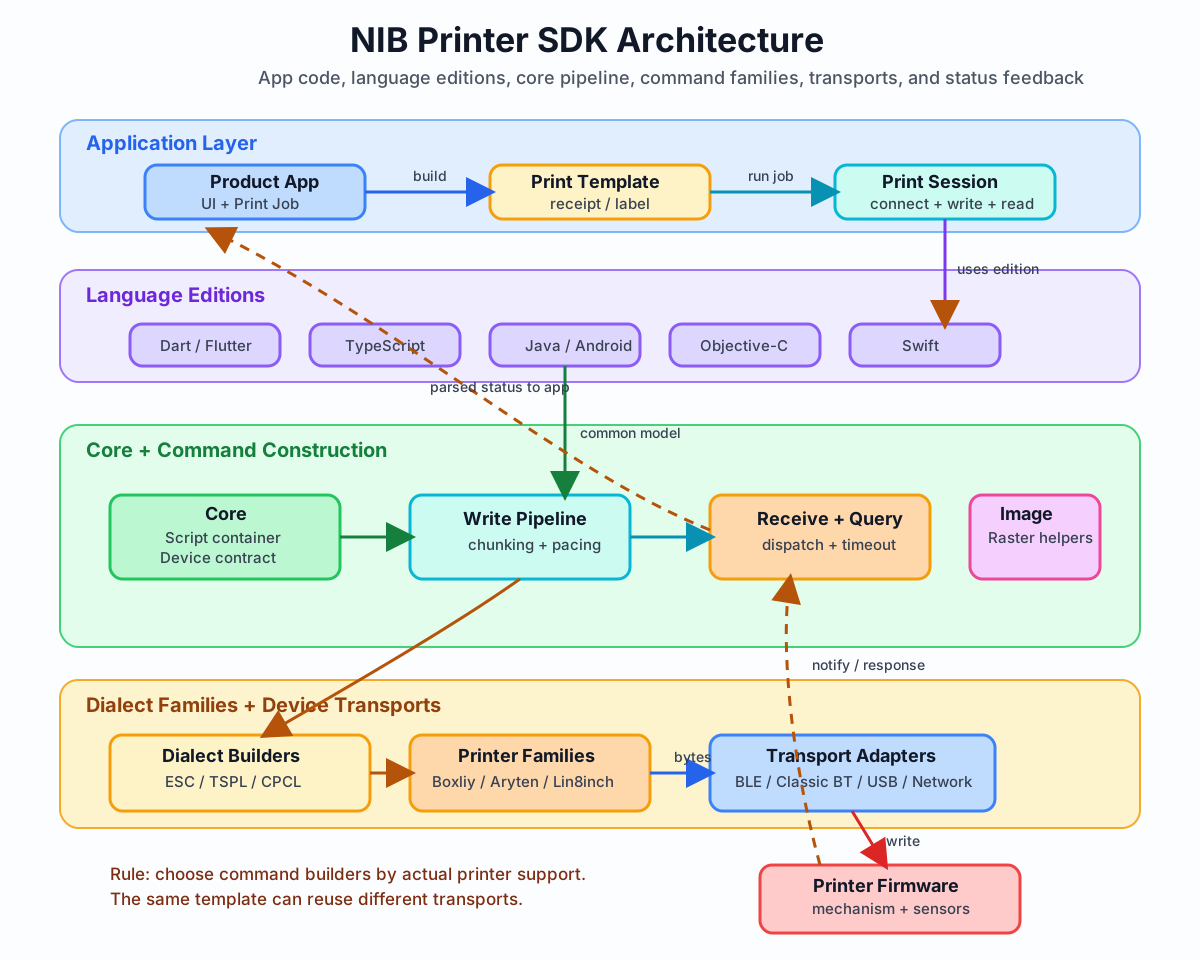
Four layers
Section titled “Four layers”| Layer | Responsibility |
|---|---|
| Core | Provides script/byte containers, the connected device contract, chunked writes, receive sources, pending queries, and response dispatch. It does not scan devices and does not decide which commands a printer supports. |
| Device | Adapts runtime capabilities such as BLE, classic Bluetooth, WebUSB, network, WeChat, UniApp, Taro, Android Bluetooth, and Apple CoreBluetooth into connected devices. |
| Dialect | Builders for printer Families and command families, such as Boxliy TSPL, Aryten ESC, and Lin8inch TSPL. This layer generates bytes the printer can understand. |
| Edition | Language-oriented delivery packages that combine common core, device, and dialect packages for easier installation and imports. |
These four layers match actual code boundaries: templates choose dialects, connections choose devices, writes and status orchestration use core, and business projects usually install an edition package or selected subpackages.
Family and command family
Section titled “Family and command family”| Family | Available command builders | Notes |
|---|---|---|
| Boxliy | ESC, TSPL, CPCL | Main command families for Qishu / Boxliy thermal printer products. |
| Aryten | ESC, TSPL, CPCL | Compatible command families that inherit the main Boxliy surface and add Family extensions only when needed. |
| Lin8inch | ESC, TSPL | 8-inch extended command families, including media, density, status, device settings, and other extended commands. |
First determine which Family the printer belongs to, then choose a command family that the printer supports. Some printers support only specific command sets. Importing a builder does not give the printer the corresponding capability.
ESC, TSPL, and CPCL are three different printer command languages:
| Command family | Common use | Integration focus |
|---|---|---|
| ESC | Receipts, thermal paper, line-oriented printing. | Text, paper feed, cutting, and basic status. |
| TSPL | Labels, barcodes, QR codes, fixed layouts. | Paper size, gap/black mark, coordinates, and PRINT. |
| CPCL | Mobile printing, labels, and ticket scenarios. | Coordinates, form boundaries, and the command subset the device actually supports. |
Shared model
Section titled “Shared model”All languages keep the same conceptual model:
- Build a print script with a dialect builder.
- Write bytes through a connected device.
- During writes, core or device packages handle chunking, write mode, timeout, and progress.
- When the printer supports it, read status through core receive/query utilities.
- Do not put transport logic inside print templates.
Cross-language consistency
Section titled “Cross-language consistency”TypeScript, Dart, Java, Objective-C, and Swift do not use exactly the same type names, but the concepts stay consistent: builders generate bytes, devices write bytes, and receive sources or query dispatchers handle responses. When migrating between languages, migrate these concepts first instead of searching line by line for methods with identical names.
SDK method names are generally named by intent, but some public methods keep historical command terms so they can be compared with printer manuals and firmware protocols. Image and raster printing capabilities are based on the SDK image/raster foundation. Normal text and label integrations do not require understanding image processing first.